Optimizing Mobile Media: Assessing the VLC iOS Redesign for Strategic Advantage
In today’s fast-evolving digital landscape, applications are not static; they are dynamic tools undergoing continuous refinement. The recent significant redesign of VLC for iOS, introducing a new interface and multi-touch gestures, presents both an opportunity and a decision point for individual users and organizations alike. This isn’t merely about new features; it’s about evaluating the potential for enhanced productivity, improved user experience, and strategic alignment with broader digital content consumption goals.
Understanding the Core Changes and User Experience ROI
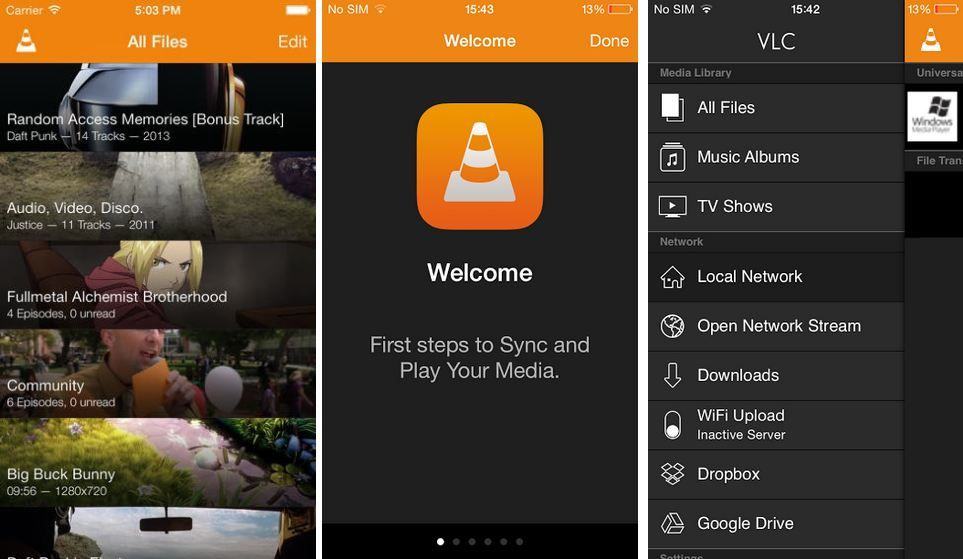
The redesign of VLC for iOS focuses heavily on streamlining the user experience, primarily through a revamped interface and the introduction of intuitive multi-touch gestures. For the individual user, this translates into potentially quicker navigation, more natural playback control, and a generally more polished interaction with their media library. The return on investment (ROI) here is often indirect, manifesting as reduced frustration, increased efficiency in media access, and a more enjoyable content consumption experience.
From a strategic business perspective, especially for organizations that rely on VLC for internal media distribution, training, or accessibility, the ROI considerations are more complex. A more intuitive interface could significantly reduce the learning curve for new users, potentially lowering support costs and increasing adoption rates. However, a major UI overhaul also carries the risk of alienating long-time users who are accustomed to the older interface, possibly requiring re-training or updated documentation. Decision-makers must weigh the benefits of a modernized experience against potential transition costs and user resistance.
Strategic Implications for Content Management and Accessibility
Beyond the surface-level changes, a redesign often hints at underlying architectural improvements that can have profound implications for content management and accessibility. Enhanced multi-touch gestures might not only improve playback but could also facilitate easier navigation through extensive media libraries, particularly on smaller screens. This can be critical for field teams accessing training videos or for employees reviewing multimedia presentations on the go.

Furthermore, major updates like this often come with silent enhancements in codec support, streaming protocols, or network capabilities, which can significantly improve an organization’s ability to distribute and consume diverse media types without conversion bottlenecks. For businesses managing large volumes of varied content, improved compatibility and performance can translate into direct operational efficiencies, reducing the need for alternative players or format conversions. The risk, however, lies in ensuring that these new capabilities integrate seamlessly with existing content delivery networks (CDNs) or enterprise content management (ECM) systems. A thorough assessment of the update’s technical underpinnings is crucial to maximize the benefits and mitigate potential integration challenges.
Risk Mitigation and Adoption Strategies
Adopting any significant software update, especially for a widely used tool like VLC, requires a calculated approach to risk mitigation. On the benefit side, staying current often means access to the latest security patches, performance improvements, and feature sets that can enhance productivity. Neglecting updates can leave users vulnerable to security exploits or stuck with outdated functionality. For individual users, the risk of updating might be minor — perhaps a temporary bug or a need to relearn gestures. For organizations, the risks are amplified: widespread deployment of a buggy update could disrupt operations, cause data loss, or create significant support burdens.
A robust adoption strategy for organizations involves several steps. Firstly, conducting a pilot test with a small group of early adopters can help identify unexpected issues before a broader rollout. Secondly, clear communication to end-users about the changes, potential benefits, and any new procedures is vital. Thirdly, providing accessible training materials or quick-start guides can smooth the transition. Finally, maintaining a rollback plan or the ability to support older versions temporarily can serve as a crucial safety net. Understanding the specific enhancements in VLC’s redesign, such as improved stability or new file management capabilities, will inform these mitigation strategies.
Measuring Impact and Future-Proofing Media Solutions
To truly understand the value of the VLC for iOS redesign, it’s essential to establish metrics for impact assessment. For individual users, this might be subjective: ‘Is it easier to use?’, ‘Do I access my media more frequently?’. For businesses, the evaluation must be more objective. Key performance indicators (KPIs) could include a reduction in media-related support tickets, an increase in user engagement with multimedia content, or measurable improvements in content delivery speeds and reliability across diverse mobile devices. Regular user feedback surveys can also provide qualitative insights into satisfaction and areas for further optimization.
Looking ahead, evaluating updates like the VLC redesign is part of a broader strategy to future-proof mobile media solutions. The digital media landscape is constantly evolving, with new formats, codecs, and streaming technologies emerging regularly. An app that actively modernizes its interface and underlying capabilities demonstrates a commitment to staying relevant. Decision-makers should consider how this update positions VLC within their overall technology stack, assessing its longevity, compatibility with future media standards, and its role in supporting an agile, responsive mobile content strategy. This proactive approach ensures that investments in software adoption continue to yield positive returns over time.
- Enhanced User Interface for intuitive navigation and streamlined access.
- Advanced Multi-Touch Gestures for more fluid and precise playback control.
- Improved Media Library Management, facilitating better organization and discoverability of content.
- Expanded Network Streaming Capabilities, potentially improving performance with various sources.
- Potential for new codec support and underlying performance optimizations, broadening compatibility.
- Enhanced Privacy Controls and Data Handling, aligning with modern user expectations.
Common Mistakes to Avoid
- Upgrading without reviewing the official release notes and known issues thoroughly.
- Assuming immediate universal user adoption without providing adequate training or transition support.
- Neglecting to back up critical media files or configurations before initiating a major application update.
- Ignoring the potential impact of new features on device battery life, storage consumption, or performance on older hardware.
- Failing to assess the redesign’s integration with existing Mobile Device Management (MDM) or enterprise content delivery systems.
FAQ Section
What is the primary ROI of upgrading to the new VLC for iOS?
The primary ROI for individual users is an enhanced, more intuitive media consumption experience, leading to greater satisfaction and efficiency. For organizations, it can translate to reduced training costs, fewer support inquiries, increased user adoption of multimedia content, and improved operational efficiency in distributing and accessing diverse media formats.
How does this update affect existing media libraries and user workflows?
While the redesign primarily focuses on the interface and control gestures, it is generally designed to maintain compatibility with existing media libraries. Users should still have access to all their content. However, the navigation and interaction methods will change, potentially requiring a brief adjustment period to new workflows. It’s always prudent to ensure backups before any major app update.
What are the key risks associated with this VLC iOS redesign update, and how can they be mitigated?
Key risks include potential bugs, user resistance to the new interface, and unforeseen compatibility issues with specific media files or network setups. Mitigation strategies involve piloting the update with a small user group, clearly communicating changes, providing transition guides, and ensuring comprehensive backups. For organizations, a phased rollout and a clear support channel are crucial.